

Homework 2
- Due: See homework page
- Written portion: Submitted on Gradescope
- Coding portion: Use Github Classroom link given at the start of the Coding portion of this page.
Updates
- 2026/01/30 - Written portion released; Coding portion to be released soon. Note: Q4 on the written portion refers to the coding problem skeleton code. We will release that very soon, but forego that problem for now.
- 2026/02/03 - Coding portion released; It’s a large code base. A good amount of time is required to read and understand the code provided. This is a learning outcome of this assignment. Then you will add in components to complete the design.
- 2026/02/06 - Posted 2 videos:
- 2026/02/12 - HW2 automated tests posted.
- If you get an error about
gtestswhen doingcmake ., perform the following:- Reinstall
gtest. (It appears Google resets the VMs or upgraded their linux version at some point). To do so, you need to already have the.customize_environmentscript from Lab 0, in your home folder (which you should!). - Go to your home folder:
cd ~CRITICAL STEP: Update the packages list/installed:sudo apt update - Now, re-run the
.customize_environmentscript:source ~/.customize_environment - Then go back to your
hw2-<username>/hw2_testsrepo and rerun the commands starting fromcmake .
- Reinstall
- If you get an error about
Written Portion
Problem 1 - More git Questions (10%)
In this problem, suppose we are working with a fictitious repository called SampleRepo (Note: this repo doesn’t exist so you can’t try the commands and expect them to work) which has a file README.md already committed to it. Let us now measure your understanding of the file status lifecycle in git. Please frame your answers in the context of the following lifecycle based on your interaction with the repository as specified below:
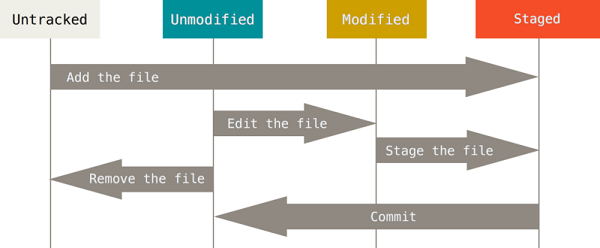
figure courtesy of the Pro Git book by Scott Chacon
Notes:
- Parts (a) through (f) should be done in sequence. In other words, when you get to part (f), you should assume that you already executed the earlier commands (a), (b), …, (e). You must use the terminology specified in the lifecycle shown above.
- For the purposes of this question, you can assume you have full access (i.e. read/write) to the repository.
- For this problem you may use online sources to look up information about
makeand Makefiles, but please cite your sources).
Part (1):
What is the status of README.md after performing the following operations:
#Change directory to the home directory
cd
#Clone the SampleRepo repository
git clone git@github.com:/SampleRepo.git
#Change directory into the local copy of SampleRepo
cd SampleRepo
Part (2) and (3):
What is the status of README.md and fun_problem.txt after performing the following operations:
#Create a new empty file named fun_problem.txt
touch fun_problem.txt
#List files
ls
#Append a line to the end of README.md
echo "Markdown is easy" >> README.md
Part (4) and (5):
What is the status of README.md and fun_problem.txt after performing the following operation:
git add README.md fun_problem.txt
Part (6) and (7):
What is the status of README.md and fun_problem.txt after performing the following operations:
git commit -m "My opinion on markdown"
echo "Markdown is too easy" >> README.md
echo "So far, so good" >> fun_problem.txt
Part (8) and (9):
What is the status of README.md and fun_problem.txt after performing the following operations:
git add README.md
git checkout -- fun_problem.txt
As an ungraded thought question, what are the contents of fun_problem.txt? Why?
Part (10):
What is the status of README.md after performing the following operation:
echo "Fancy git move" >> README.md
Problem 2 - Makefiles (15%)
Prerequisite: make lab.
- If the lab session covering
makehas not happened yet, consider waiting until it is covered.
Part (1):
Every action line in a makefile must start with a:
- TAB
- Newline
- Capital letter
- Space
- It doesn’t matter, any character can start an action line
Look at the Makefile below and answer the following question. Assume this Makefile is in the current directory, and all required files are available.
IDIR=.
CXX=g++
CXXFLAGS=-I$(IDIR) -std=c++11 -ggdb

LDIR =../lib

LIBS=-lm

DEPS = shape.h

OBJ = shape.o shape1.o shape2.o

%.o: %.cpp $(DEPS)
	$(CXX) $(CXXFLAGS) -c  $< -o $@

all: shape1 shape2

shape1: shape1.o shape.o
	$(CXX) $(CXXFLAGS) $^ -o $@ $(LIBS)

shape2: shape2.o shape.o
	$(CXX) $(CXXFLAGS) $^ -o $@ $(LIBS)


.PHONY: clean

clean:
	rm -f *.o *~ shape1 shape2 *~
Part (2):
If we ran the following, which rules would execute?
make
Part (3):
If we ran the following, type out the first compiler command that would execute with EXACT parameters. Don’t put any leading or trailing spaces before the first text or after the last text, and put 1 space between each parameter/word (e.g. g++ -g ... shape.o).
make shape1
Part (4):
If we ran the following, type out the last compiler command that would execute with EXACT parameters. Don’t put any leading or trailing spaces before the first text or after the last text, and put 1 space between each parameter/word (e.g. g++ -g ... shape.o).
make shape1
Part (5):
What is the purpose of a .PHONY rule?
Part (6):
What are acceptable names for a makefile? Select all that applies.
- Makefile.txt
- Makefile
- makefile.sh
- makefile
Problem 3 - ADTs (50%)
Prerequisite: ADT lecture
- If ADTs (List, Set, Map, etc.) have not been covered in lecture yet, consider waiting to start this problem until it is covered.
For each of the following data storage needs, choose which abstract data types you would suggest using. Natural choices would include list, set, map, queue, stack, priority queue, etc. but also any simpler data types (string, int, double) that you may have learned about before. If two are equally suitable, check all that apply.
Important Notes for Exams:
On an exam:
- You must NOT just say “a list”, but provide a description of what the items, keys, etc. are. For example, you should say “a list of integers” or “a list of names (strings) and a GPA (double)”.
- If you specify a map please describe what the key AND value will be (e.g. a map where the key is a string (student name) and the value is the corresponding Student object).
- You will likely be asked to give a brief explanation for your choice: we are grading you at least as much on your justification as on the correctness of the answer. Also, if you give a wrong answer, when you include an explanation, we’ll know whether it was a minor error or a major one, and can give you appropriate partial credit. Also, there may be multiple equally good options, so your justification may get you full credit.
For this homework: Choose the correct ADT. We recommend you NOT look at Gradescope but treat these like exam questions (following the procedure above) and only once you are confident in your answer, go to Gradescope and key in your answers.
Part 1
A data type to store the text of the steps of a recipe for how to bake a cake
Part 2
A data type that stores all the TV station identifications (e.g. KABC, KNBC, etc.) so we can ensure new stations don’t reuse the same identification.
Part 3
A data type that stores what players (assume names are unique) are on each team (given by the team name) in a league and allows quick lookups of all the players on a team as well as if a given player is on a particular team (i.e. given a team name and player name, we can quickly ascertain if that player is on that team).
Part 4
A data type that associates a file extension (e.g. cpp, pdf) with the possible programs that are able to read/open that kind of file
Part 5
A data type that stores student records and allows easy determination of their registration ordering with students with more units registering first.
Problem 4 - Class Structures and OO Design (25%)
Prerequisite: Inheritance and Polymorphism
- If Inheritance and Polymorphism have not been reviewed in lecture (though they were covered in 103), consider waiting to start this problem.
Read the Web Search programming problem desribed in the second half of the assignment carefully (several times), and study the provided skeleton code.
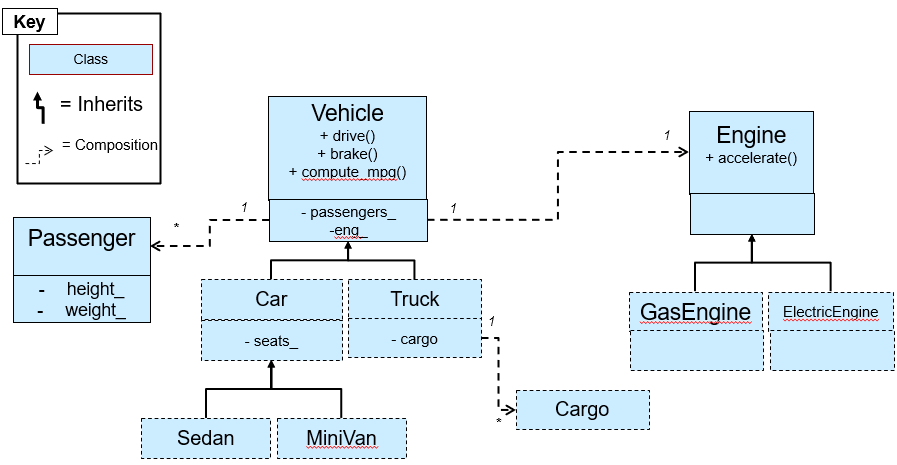
Draw an inheritance diagram (an example of an inheritance diagram is shown below) of all the classes in the skeleton code, as well as all of the classes you need to create for this assignment. Show any inheritance relationship as well as important composition (has-a) relationships between the classes we’ve given of important data members (you can ignore composition relationships of basic string, int, etc. data members). We recommend you show key/important functions, especially virtual functions of each class. Before you can show composition relationships, you will need to consider what data members might need to be added to various classes (in particular the SearchEng and derived Handlers). This should act as a planning exercise for the coding assignment.
Provide your diagram and answers in PDF. You can use any drawing program you wish (hand-drawn and scanned is also fine if you draw neatly).
Next, provide an explanation for the following questions.
- Why do we have an abstract
PageParserclass, and why do we have a pure virtualparsefunction inside thePageParserclass? - Why does the
Handlerclass have a pure virtualprocessfunction? - Consider the class hierarch/organization and list the the sequence of class function calls (i.e. who calls who) that will result from an
ANDquery (e.g.AND term1 term2), starting from theSearchUI::run()until the results are computed and displayed.
Example of how to show inheritance diagrams:
Coding Portion
Github Classroom URL
Signup link to create your HW2 repo: signup link
Reminder: A Few Notes on Repositories
-
Never clone one repo into another. Clone your new homework repo under (in) the
cs104-repos. - Clone your repo using the
sshapproach, NOThttps.- Clone your repo:
git clone git@github.com:usc-csci104-spring2026/<your_hw2_repo>
- In the VS Code editor, choose
File..Open Folderand then find and open that folder (i.e.cs104-repos/<your_hw2_repo>)
Problem 5 - Web Search (Inheritance, Polymorphism, Sets, Maps) (100%)
Prerequisite: ADTs, C++ STL (map<K,V>, set<T>, etc.), Inheritance and Polymorphism
- If ADTs, C++ STL, Inheritance and Polymorphism have not been reviewed in lecture (though they were covered in 103), consider waiting to start this problem.
Skeleton Code
Don’t worry about the number of source files you see. Many are complete and others will be short and/or repeat the same pattern of code. So the overall amount of code you have to write will not be TOO large. The main task is to understand how all the classes fit together and choose the appropriate ADTs in the SearchEng class.
Read through the contents of this description a few times (even if it seems long).
Overview
This problem will have you implement a search engine (mimicing a toy version of Google or the like) that handles webpages stored in an index file, from which parsers for different file extensions can pull out useful information such as text and incoming/outgoing links to other webpages. We will then implement a text/menu-based user interface that provides command handlers for various commands which then calls into the search engine to carry out the command.
As you will see, all of this will require using quite a lot of the object-oriented design principles along with many of the ADTs / data structures you are learning about. You will use C++ STL vector, map, set, etc.
We may build off of this project in a future homework. We will not provide solutions so anything you do not get working in this HW will need to be fixed in the future. So PLEASE work hard to complete this homework.
In addition, we provide you a lot of code and structure so that you can see “good” examples of object-oriented design. A major learning objective of this homework is for you to study and learn how the provided code works and to also understand how its structure simplifies modularity and extendability for the future. Again, recall that your ability to read and understand others’ code is on par with being able to write your own.
We also heavily utilize inheritance and polymorphism. Understanding how they work and the benefits of using them is a key learning outcome of doing this assignment. So please spend some time understanding and considering the given design.
At a high level, a search engine is based on the following components:
- A real search engine would use a crawler, which retrieves pages from the web. You may write a simplified crawler as part of a later assignment. For now you will use a single file (aka index file) that specifies the names of the all the files/pages that should be searchable.
- A component that parses the web page files given in the index file to extract the relevant information, such as text, links, etc. You will do this here for an extremely stripped-down version of Markdown (
.mdfiles) or raw text (.txtfiles), though we will use OO principles to allow for alternate formats to be parsed in the future. - A database (or search engine) component that stores information from parsed pages and allows for search queries by providing quick lookup of all the pages that contain the words/terms of a query.
- A user interface component to accept commands for performing queries, displaying pages, or displaying the links of a page.
- A ranking algorithm that takes all results and puts them in an order of relevance to the given query. You may also implement this in a later assignment.
- Optionally, a way for users to log in so that the engine can learn about the preferences of an individual and output more relevant results. You might do that in a later assignment as well.
For this assignment, we focus on parsing and simply returning all answers to a query, without worrying about ranking or user customization. Notice, however, that you want to keep an eye on making your code well documented and extensible by using good object-oriented principles (encapsulation, loose-coupling, inheritance/polymorphism, and appropriate distribution of responsibilities, etc.) in case we add to it later. (That said, you will also be allowed to rewrite your code later.)
Related Videos
- Video1 - Polymorphism and Design Patterns: Common polymorphic approaches to software design. Background knowledge that we will refer to in this homework.
- Video2 - Homework Walkthrough: Tour of the code and help for the inheritance diagram for this homework.
Parsing Web Pages
Your first challenge is to complete a simplified MD parser. We want our search engine to be able to support alternate file formats (TXT, MD, HTML, etc.) so we created an abstract PageParser class with a parse method.
    void parse(std::istream& istr,
               std::set<std::string>& allSearchableTerms,
               std::set<std::string>& allOutgoingLinks);
In general, we want to parse files and find all the searchable terms. To simplify our definition of searchable terms, we will consider text consisting of letters, numbers, and consider all other characters as special characters. The interpretation is that any special character (other than letters or numbers) should be used to separate words, but numbers and letters together form words (aka “terms”). For instance, the string Computer-Science, 104 is really,really5times,really#great?I don't_know! should be parsed into the search terms: “Computer”, “Science”, “104”, “is”, “really”, “really5times”, “really”, “great”, “I”, “don”, “t”, “know”. Thus, during parsing, any contiguous sequence of alphanumeric characters form a search term. All other characters (special characters) will be used to split search terms and, for the sake of searching, can be discarded. In addition, you may want to convert searchable terms to a standard (canonical) form so that a search for computer would match a webpage containing Computer. We have provided some functions in util.h/cpp that can help you convert to a standard case.
TXT File Parsing
We have provided an implementation of a .txt file parser (txtparser.h/.cpp) that you may use for reference when completing the following MD parser. We assume .txt file can contain no hyperlinks to other pages, so we only need to parse the text for search terms. And the display function just creates a string with all the text from the file.
HOWEVER, by studying how we implement this, you should be able to implement the Markdown parser more easily.
Markdown Parsing
You should complete the derived MD parser class in md_parser.cpp that implements the parse function to parse a simplified MarkDown format. If you are unfamiliar with Markdown you may like to read this tutorial and especially the links section. We will only support normal text and links in our Markdown format and parser. In addition to text, you should be able to parse MD links of the form [anchor text](link_to_file) where anchor text is any text that should actually be displayed on the webpage and contains searchable terms while (link_to_file) is a hyperlink (or just file path) to the desired webpage file. A few notes about these links:
- The anchor text inside the
[]could be anything, except it will not contain any[,],(, or). It should be parsed like normal text described in the previous paragraph - A valid link will have the
(immediately following the], with no characters between. If that is not the case, then the text is not a link. - You may assume the
link_to_filetext will not have any spaces and should be read as a single string (don’t split on any special characters). - There may be text immediately after the closing
). You should just treat it as a new word. - Text in parentheses that is NOT preceded immediately by
[]should NOT be considered as a link but just normal text. So in the text: “ArrayLists (aka vectors) support O(1) access”,aka vectorsand1should be considered normal text and not a link.
The goal of the parser is to extract all unique search terms and identify all the links (i.e. all the link_to_files) found in the (...) part of a link and return them in the allSearchableTerms and allOutgoingLinks sets that were passed-by-reference to the function.
If the contents of a file are…
[Hello ] world[hi](data2.txt)bye. (Table, t-bone) steak.
…then allSearchableTerms should contain: Hello, world, hi, bye Table, t, bone, steak. In addition, allOutgoingLinks should contain just data2.txt. Note that you can return the words in any normalized case you like that would make case-insensitive searching easier.
You may implement the Markdown parser as you see fit. However, we recommend you consider using a finite state machine (FSM) approach to read the file character by character and use “states” to determine how to process/handle that character and whether text is a normal term, a link, etc. The diagram below shows a potential FSM for parsing Markdown. Here we assume we read 1 character (i.e. c) at each iteration until we reach the end of the file and process c as well as use it to transition between states. We can use the isalnum function from the cctype library in C++ to check whether a character is a valid character for a search term. In addition, we assume we maintain two strings: term and link where we can append characters until we are ready to split and start a new term/link.
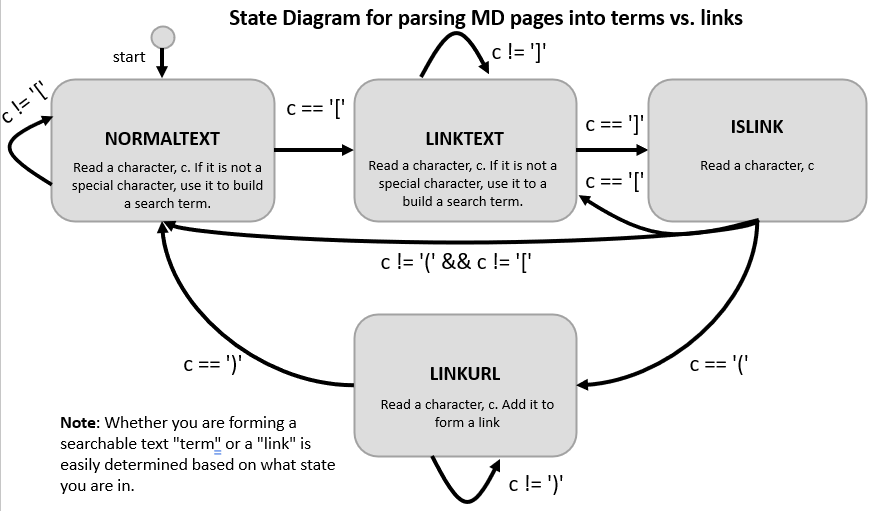
In addition to parsing search terms, the parsers will implement a display_text function to generate a displayable text string. This function strips out URL/links from the text contents of a file and only shows the anchor text. For example, if the md file contains:
[Hello ] world[hi](data2.txt)bye. (Term)
would be displayed as:
[Hello ] world[hi]bye. (Term)
Edge cases for MD Parsing
Example 1: The below is an ill-formed link. We will allow parsing to continue, but no link would be returned/added (i.e. the set of outgoing links would be empty). So note that empty strings for search terms and links should just be ignored.
[empty url afterwards]()
Example 2: For the below, all the text after [ would be parsed as terms but no link would be generated.
[there is no closing square bracket
Example 3: For the below, everything after the ( can be considered part of the link, though obviously it would be wrong. Essentially, if the user makes this mistake, they should not have any expectation of our parser to recover.
[some text](there-is-no-closing-parentheses
Example 4: The example below happens all the time in web pages. Still list the link. The linked page/file just doesn’t exist on the server.
[some text](url-to-nonexistent-file)
Example 5: The example below if fine. There are just no terms to parse, but the link is valid.
[](some-file)
Index files
Your actual search engine application will need a list of all the webpages to parse. This would normally be done with some kind of web crawler application but for now we will just provide a text file (called an index file) that will contain the names of all the webpage files you need to parse and be able to search. Here is a sample index file that assumes the pages exist in a subdirectory named test-small underneath your hw2 folder.
File: test-small/index.in
test-small/pga.md
test-small/pgb.md
test-small/pgc.md
test-small/pgd.md
test-small/pge.md
test-small/pgf.md
test-small/pgg.md
test-small/pgh.txt
The contents of index.in are the file names of the web pages themselves, one per line. Each web page is stored in its own file. Your program should then read in all the web pages whose file name was listed in the index. There will be no format errors in the index file other than possibly blank lines, which you should just skip and continue to the next line. If any file cannot be opened you may output an error message but should continue to the next file and try to parse it.
We recommend that you store the index file and the other webpage files in a subdirectory just to keep your code and data files separated. We have already done this in the test-small subfolder provided in your starter code.
The index file will be passed via the command line to your application:
$ ./search-shell test-small/index.in
Note: You may assume that file/page names are case-sensitive and may not contain spaces.
WebPage Class
After parsing a webpage we need to store the data and prepare it for searching and tracking link relationships. We have created a WebPage class for this. The code is provided in files webpage.h/cpp. You’ll want to understand the data that these objects store and track so you can use and create them when parsing.
The function all_terms() should return all individual searchable terms that the parser found.
Outgoing links are those that occur in the current webpage (i.e., they point from “this” webpage to some other page). These are all known immediately after parsing. However you should also store and track (for future assignments) the incoming links which are the page (file) names that link to “this” webpage. You’ll likely need to add these little by little as you parse more pages. If, as you are parsing a page you encounter a link to another, you may need to create a WebPage object for that linked page before you actually parse that page. So you’ll need to keep track of whether or not pages exist and ensure you don’t make two WebPage objects for the same page. Note: We won’t use the incoming and outgoing links directly (other than printing them out) in this assignment but we will test your code to ensure you are identifying and adding them correctly. We just wanted you to parse and store them now so you don’t have to add that later on in the next assignment. These links could form an important part of a future homework.
As an example, if a page named test-small/pg1.md has the following contents
[another link1](test-small/pg2.md) [link3](test-small/pg3.md)
then test-small/pg1.md would have an outgoing link to test-small/pg2.md and test-small/pg3.md. And they in turn, would have one incoming link from test-small/pg1.md
Note: We use typedefs in webpage.h to make shorter type names. Feel free to lookup more info on typedefs if they are unfamiliar.
Create a Command-line UI for Searching and Displaying Page Info
Separation of UI and Search operations
We can imagine that there may be many different interfaces to the primary web search engine. We could have a web-based interface, a stand-alone GUI application, or (as we will have for this project) a terminal-based, text interface. Because we should NOT couple the search abilities and the UI for accessing it, we will split these into different classes. You will implement a SearchUI and SearchEng class. The SearchUI provides a text interface that allows user to enter commands to search for and retreive webpage information and a SearchEng class that implements these basic operations regardless of the interface.
Search UI and Commands
In searchui.h/cpp, we will implement the main user interface logic which will use the terminal and perform text-based queries via some form of std::istream/std::ostream. The SearchUI class is complete but makes references to other classes in the cmdhandler.h/cpp and searcheng.h/cpp files that you will need to write.
You may assume all commands will be on a single line and NOT span multiple lines. We have defined an enumeration that will be used to return status from command handling.
- HANDLER_OK: The command was able to complete and processing should continue.
- HANDLER_ERROR: An error occurred but processing should continue.
-
HANDLER_QUIT: The
QUITcommand was entered and the program should exit.
Menu of Commands
-
QUITshould quit the program by returning HANDLER_QUIT. -
AND word1 word2 ... wordN: the user wants to see all the pages that contain ALL of the given words. The number of words here can be arbitrary. There will always be at least one whitespace between each element (ANDand any of the search term(s)). If no terms are provided, just return an empty set. If only one term is provided, return all the pages containing that term. No errors may occur for an AND command. -
OR word1 word2 ... wordN: the user wants to see all the pages that contain ANY (at least one) of the given words. The number of words here can be arbitrary. If no terms are provided, just return an empty set. If only one term is provided, return all the pages containing that term. No errors may occur for an OR command. -
DIFF word1 word2 ... wordN: the user wants to see all the pages that contain word1 but do NOT contain ANY of the following words (i.e. find the pages that have word1 and then remove any of those pages that also contain word2, then remove any of the remaining pages that contain word3, etc.) The number of words here can be arbitrary. If no terms are provide, just return an empty set. If only one term is provided, return all the pages containing that term. No errors may occur for a DIFF command. -
PRINT page: displays a webpage using the display format described below (i.e. with links removed). Return HANDLER_ERROR if the page does not exist. You may need to catch an exception from the search engine and then return the HANDLER_ERROR -
INCOMING page: displays the number of incoming links for the specified page and then lists those page names (1 per line) that have a link topage. Return HANDLER_ERROR if the page does not exist. -
OUTGOING page: displays the number of outgoing links for the specified page and then lists those page names. Return HANDLER_ERROR if the page does not exist.
Queries should be case-insensitive, so if the user typed “UsC”, and a page contained “USc”, that page should be a match. In response to the query, you should tell the user how many pages matched his/her query, and if it was more than 0, display all the page filenames. We have provided this logic to you in a display_hits(...) function in util.h/cpp. You MUST use it for display results of AND, OR, DIFF queries. For commands that require a page name, you may assume the page/file name entered is case-sensitive and you do not have to worry about converting the cases.
Examples of each command are provided in the test-small folder under search. There is a sample index file and pages. By running the input of query1.txt you should get the output in query1.exp. The same is true for query2.txt and query2.exp. Please study these carefully to ensure you understand what each command should do.
Command Processing and Polymorphism
To process commands from the user, we will use a polymorphic approach to try to make each command and its processing loosely coupled from others AND to allow for easy addition of NEW commands/capabilities in the future that do not require modification of existing code. Rather than writing a large if..else if..else if style statement to check commands, we have provided you a base class Handler in handler.h and handler.cpp. This class defines a handle function which will invoke virtual helper functions (that are protected) to see if the derived class a.) can process this kind of command and if it can, b.) actually process (carry-out) the desired command. This approach uses a common design pattern for object-oriented programming called “chain of responibility”. A great website to read more about this and other design patterns is sourcemaking.com.
We have already written two derived classes to process the QUIT command and PRINT command in cmdhandler.h and cmdhandler.cpp. Use that as a guide for writing classes for the AND, OR, DIFF, INCOMING, and OUTGOING commands. You can put all the classes in the same file (cmdhandler.h and cmdhandler.cpp). If you look at the handle() function you will see its signature is:
HANDLER_STATUS_T handle(SearchEng* eng, const std::string& cmd, std::istream& instr, std::ostream& ostr);
Note: Most of the command handlers will simply call a corresponding function in the SearchEng class to carry out the actual task. (See the PRINT handler).
We will pass in the search engine so you have access to all of its public functionality, cmd is the identifier of the command (i.e. QUIT, PRINT, AND, OR, etc.), and instr and ostr are the the input and output streams from which you can read in the remaining, expected arguments for the specific command (e.g. search terms, etc.) and output the results (in this way, we can read and print result to files or to cin/cout).
We included this design approach so you can see how it can make processing cleaner. If you look at SearchUI::run() you’ll notice the loop to process commands is very simple and straightforward. In addition, we achieve more loose coupling because now we can add support for new commands by simply writing a new derived Handler class and instantiating it and adding it to the chain in the SearchUI. Nothing in SearchUI::run() would need to change.
In main(), you will need to create these derived command handler objects and register them with the SearchUI object before calling SearchUI::run(). You MUST use this command handler approach rather than simple if statements for checking command inputs. Spend some time to understand how this chain-of-responsibility design works by reading and studying the code a few time and referring to the given website. Consider its benefits. If you have any questions, please talk to your instructor or TA.
You will need to complete the rest of cmd_handlers.cpp to implement the commands just described.
Search Engine
At the heart of this assignment is the search engine (database). To implement the search operations we have provided a SearchEng (Search Engine) class that can be used to store all the webpages objects and indexing data as well as actually performing the search operations and returning the appropriate WebPages. In order to be able to answer queries, you should use an appropriate data structure that will allow you to know the set of web pages that contain a particular word/term. Since you do NOT want to have to scan all webpages on each query, you should build this data structure as you parse all the webpages or update it anytime a webpage is added. This data structure is the heart of this assignment, choose it carefully. Again, given a term you would want to know the set of webpages that contain that term.
Also, in order to not run into memory problems, you probably do not want to store duplicates of WebPage objects, as that would duplicate huge amounts of text. Instead, depending on where you store the web pages, you may want to use a set of indices (i.e. an integer index to a list) or pointers to WebPage objects. The exact choice here is up to you.
Combining Search Results
For the AND, OR, and DIFF commands there is great amount of commonality in the code you would write to implement these searches. Each of these commands may provide multiple search terms. Much of the code for implementing these 3 approaches is the same except for how to combine the set of webpages that have one term with the set of webpages for another term. Thus rather than repeating our code we will use polymorphism. The SearchEng::search() function takes in a generic WebPageSetCombiner pointer to use to combine two sets of webpages based on a particular strategy: AND, OR, DIFF. You will implement 3 derived classes, one for each strategy. In this way, we not only can avoid duplicate search code but we can potentially come up with additional search strategies in the future. You should implement these three derived classes in the combiners.h/cpp files. The appropriate command handlers should create and pass in the appropriate WebPageSetCombiner to SearchEng::search(). In SearchEng::search(), you will need to look up the sets of webpages that contain a particular term and then combine them by calling the virtual WebPageSetCombiner::combine function. These combine functions must run in O(m log(m)) and NOT O(m^2) where m is the size of a set.
Furthermore, if we suppose there are n total searchable terms used over all webpages and a user performs a query with k search terms, and the maximum number of webpages that match any single term is m, then the query/search MUST be performed in runtime O(k*log(n) + k*m*log(m))
The SearchEng class is also responsible for storing the various parsers and applying them when files are read. We can register parsers for files with given extensions (e.g. .md or .txt files). You will need to track the parsers for each extension. You should assume that once registered, the SearchEng class owns these parsers and is responsible for their cleanup. Then we will also need the ability to actually read and parse files given an index file. The SearchEng class has the following two member functions for this purpose:
  void register_parser(const std::string& extension, PageParser* parser);
  void read_pages_from_index(const std::string& index_file);
The second function will be given the filename of an index file (which in turn contains names of all the webpage as described earlier in this section). You should read each file specified in the index file one at a time and update/add it (and its information) to your data structures.
To parse the files use the appropriate parser that was registered for each file’s extension. By having a base PageParser the client can pass in derived implementations for MD parsing, HTML parsing, etc.
PRINT/DISPLAY a Page: SearchEng should also use the appropriate parser to generate the display version of a webpage. This should be implemented in the display_page member function which should output (to the provided ostream) the page’s text as seen in the file except when you encounter a link. For links you should just print the anchor text in brackets, but not the contents of the parentheses link or the file name. So for the MD file example provided earlier, you’d display:
[Hello ] world[hi]bye. (Table, t-bone) steak.
To generate this display text you can call the related page parser’s display_text function.
You may add any additional member data and functions you desire to this class but do not change the given functions’ interface.
Overall Application and main()
Your user interface, search engine and the main application will be initiated in search-shell.cpp which contains main(). Here you will create the search engine and search UI objects as well as the necessary parsers and command handlers.
main() is defined in search-shell.cpp and will require some modification.
Input and Output Stream Usage
To allow for automated testing we will support input from either the keyboard (cin) or a file of pre-written commands in a “query” file (via an ifstream). Similarly, output from your program can be sent to cout or an output file (ofstream). The user will indicate their desire via command line arguments. In general, the user will provide between 1 and 3 command line arguments.
- The first command line argument will be the index file of webpages to parse.
- The optional second command line argument will be an input file of pre-canned commands to run
- The optional third command line argument will be an output file to save all the outputs from the commands in the input file. (Note: We cannot have an output file without using an input file)
So if the user runs the following command, then both input and output should be taken from cin/cout.
$ ./search-shell data/index.txt
Or if the user runs the following command, then input commands should be taken from the file cmd1.in while output should go to cout.
$ ./search-shell data/index.txt cmd1.in
Or if the user runs the following command, then input commands should be taken from the file cmd1.in while output should go to cmd1.out.
$ ./search-shell data/index.txt cmd1.in cmd1.out
All of our SearchUI functions use generic std::istream or std::ostream references so that you can pass in either cin or an ifstream and similarly cout or an std::ofstream. By passing in the correct streams from main() to SearchUI::run() the remainder of your code need not be concerned with the source of input or output.
Completing your Makefile
Also remember to complete the provided Makefile to ensure all your code compiles correctly. Follow the sample targets already provided and complete the the remaining targets and target for the executable search-shell. Again, a change in a .h or .cpp should trigger compilation of only those .o files that depend on that .cpp and related .h files. The executable should be recompiled if any .o file has been updated.
Other Requirements
-
You may not use any algorithms from
<algorithm>and that includesset_intersection,set_union, etc. Also, you may still NOT use the C++autokeyword or ranged loops. -
You may not change any public interface of a provided class. You may add private helper functions as desired, and data members where needed.
-
Be sure to meet the runtime requirements for
SearchEng::search()described above -
Be sure to handle the check for and throw the appropriate exceptions listed in the header file (
searcheng.h) documentation for variousSearchEngmember functions.
Files to Update
The files you will need to complete are:
-
cmdhandler.handcmdhandler.cpp -
combiners.handcombiners.cpp -
md_parser.cppand potentiallymd_parser.h search-shell.cpp-
searcheng.handsearcheng.cpp Makefile
All other files are complete, though you’ll need to read through them carefully to understand what you’ve been given.
Recommended Ordering of Implementation
We recommend the following order of implementation:
-
Complete your
MDParser. You may consider writing a separate test program (i.e..cppprogram with amain()) that creates an MDParser and parses a sample MD file, but we have also provided a set of MD parsing tests inmdparse-tests.cpp. You can compile them withmake mdparser-testsand then run them as./mdparser_tests. -
Update/complete your
Makefilefor each.cppfile. -
Complete the various
WebPageSetCombinerderived implementations (incombiners.h/cpp) -
Implement the remainder of the
SearchEngclass. -
Implement the derived
Handlerimplementations for each UI command in thecmdhandler.h/cppfiles. -
Complete the
main()application insearch-shell.cppby creating the various objects, registering them, etc.
Testing
Small Data Set
While we will provide unit tests, you can also use the data files in the test-small folder to run sample queries. Examine the .md and .txt files provided and consider what AND, OR, DIFF, INCOMING, and OUTGOING commands might be useful to try to validate your implementation. To help get started we have provided two sample sets of input commands and the expected output.
./search-shell test-small/index.in test-small/query1.txt test-small/query1.out
You can then compare your output (test-small/query1.out) to the expected output (test-small/query1.exp).
You can repeat the same for query2.txt.
Be sure to understand the contents of the pages in test-small and what the commands in query1.txt and query2.txt SHOULD do and why the expected outputs are what they are, so that if your output doesn’t match the expected output you can know where to start debugging.
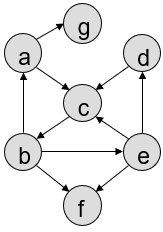
Here is an image of the graph that the webpages in the test-small directory (i.e. pga.md, pgb.md, etc.) and their links create.
Golden Versions of the Project
So that you can more easily ensure your program behaviour matches our expected behavior, we have provided a COMPILED, WORKING executable of the solution. We have a version for newer M1 Macs and all other laptops running Docker: search-shell-m1 (for M1 Macs running Docker) and search-shell-x86 (for all other laptops running Docker).
So if you like you can run that with some inputs to see what should happen:
./search-shell-x86 test-small/index.in
Or regenerate the expected output described above by running:
./search-shell-x86 test-small/index.in test-small/query1.txt test-small/query1.out
(If you are on an M1 laptop, replace x86 with m1).
Submission Files
-
Add, commit and push your source files including all the
.cppand.hfiles andMakefile. -
Do NOT add/commit/push
.ofiles or executables (things that the compiler can easily generate anytime we need). If you want to avoid adding files you should not, you can add the following lines to your.gitignoreand then save, add, commit, push the.gitignore
<any previous contents>
*.o
websearch
Do NOT commit/push any test suite folder/files that we provide from the resources repo. When we grade your code, we will move a fresh copy of the hw2_tests folder into your repo, cd to that test folder, and run
cmake .
make grade
Your code must pass the tests to receive credit. You can essentially do this step yourself to ensure you pushed all the files and correct versions of those files by following the instructions below.
WAIT You aren’t done yet. Complete the last section below to ensure you’ve committed all your code.
Commit then Re-clone your Repository
Be sure to add, commit, and push your code in your hw2 directory to your assignment repository. Now double-check what you’ve committed, by following the directions below (failure to do so may result in point deductions):
- In your terminal,
cdto the top level folder (e.g.cs104-repos) that has yourresourcesandhw2-<your_reponame>repos, etc.
cd ~
cd cs104-repos  # or wherever you store your repos
- Create a subfolder called
verifyusing themkdircommand below and thencdinto that folder.
mkdir -p verify
cd verify
- Clone a new copy (of the latest contents that you pushed) of your assignment repo hw_username repo:
git clone git@github.com:usc-csci104-spring2026/hw2-<your_reponame>.git`
cd hw2-<your_reponame>
- Copy the test suite folder again into this new repo copy: `
cp -rf ../../resources/hw2_tests .
- Recompile and rerun your programs and tests to ensure that what you submitted works. You may need to copy over a test-suite folder from the
resourcesrepo, if one was provided.
cd hw2_tests
cmake .
make grade
And ensure all the tests pass (or the ones you expect to pass).
If there is a discrepancy, you likely did not add/commit/push your latest code. Go back to your cs104-repos/hw2-<your_username> repo/folder and figure out what did not get pushed, and rectify the situation.
Then, you can come back to cs104-repos/verify/hw2-<your_username>/hw2_tests and re-run make grade, repeating this process until it gives the expected results.